
In the ever-evolving world of software development and operations, the choice of deployment model is critical to achieving both operational efficiency and high availability. The introduction of DevOps practices has further emphasized the importance of selecting a deployment strategy that not only aligns with the organization's operational goals, but also supports continuous integration and delivery. This article explores the main DevOps deployment models and offers insights that will help you choose the right one for your organization.
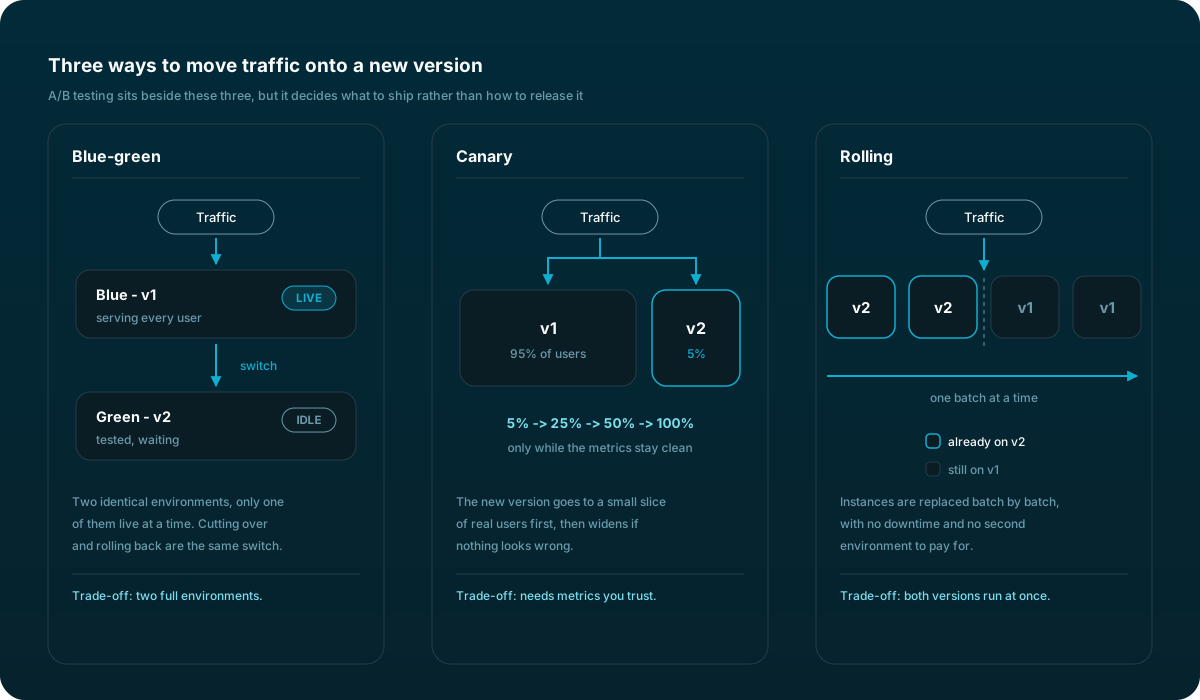
Deployment models in DevOps define how changes are delivered to production environments. These models are crucial for managing risk, ensuring reliability and enabling rapid deployment. With the right model, teams achieve seamless collaboration, faster deployments and more reliable systems.
Key deployment models in DevOps
1. Blue-green deployment
Blue-green deployment involves maintaining two identical production environments, only one of which is live at any given time. When you are ready to deploy a new version, you deploy it into the inactive environment (green). After testing and verification, traffic is switched from the current live environment (blue) to the green environment, which then becomes the new production. This model makes rollback easy, reduces downtime and increases reliability.
2. Canary deployment
Canary deployment is a pattern where a new version is rolled out to a small subset of users before it is made available to the entire user base. This strategy allows you to monitor and evaluate the new version under real usage without affecting all users. If the canary release performs well, it is gradually rolled out to everyone. The model helps identify issues early, with minimal impact.
3. Rolling deployment
Rolling deployment is the process of gradually replacing instances of the previous version of an application with instances of the new version, without downtime. The change is rolled out slowly, so that at any given point users are served by both versions. This model minimizes downtime, but it requires the application to support backward compatibility, because different versions coexist during the deployment.
4. A/B testing
Although it is not a deployment model in the traditional sense, A/B testing is often mentioned in the context of DevOps for its role in deployment strategies. It involves comparing two versions of an application to determine which one performs better. A/B testing is more about making data-driven decisions regarding user experience than about the deployment process itself.
Choosing the right deployment model
The choice of deployment model depends on various factors, including the organization's tolerance for risk, the need for downtime and the complexity of the application. Here are some considerations to help you choose:
- Risk tolerance: if your organization has a low tolerance for risk, blue-green deployments offer an easy rollback strategy. Canary deployments allow for incremental exposure, which also reduces risk.
- Downtime: to avoid downtime, blue-green and rolling deployments are preferred. Canary deployments also minimize user impact.
- Resource availability: blue-green deployments require double the resources, since two environments are maintained simultaneously. Rolling and canary deployments are more resource-efficient.
- Complexity: complex applications might benefit from the controlled environment of blue-green deployments, whereas simpler applications adapt easily to rolling or canary deployments.
For organizations embarking on their DevOps journey, or looking to optimize their deployment processes, considering these models is a step toward more efficient, reliable and successful software delivery. As DevOps continues to evolve, staying informed and adaptable to these deployment strategies will be key to maintaining a competitive edge in the fast-paced world of technology.